
Your best move is a pantry-aware app for ongoing weekly plans, and the 5-input prompt method (household, time, diet, equipment, pantry) with a general chatbot for one-off meals. Initial setup runs 15 to 25 minutes, and weekly upkeep drops to 3 to 8 minutes once your profile is built. Some apps bake pantry-aware logic in from day one, so you can skip much of the manual setup.
TL;DR:
- Pantry-aware apps track inventory, expiration dates, and meal history to create more accurate weekly plans and reduce food waste.
- Using a dedicated meal-planning app with persistent profiles offers better grocery list consolidation and reduces the need for manual input each week.
- AI tools work best when used together: chatbots for single-meal ideas and pantry-aware apps for weekly plans and inventory management.
- Proper setup takes 15 to 25 minutes initially, with weekly maintenance typically requiring only 3 to 8 minutes once your profile is established.
- Cross-check AI-generated nutrition and recipe details with reputable sources and consult a dietitian for medical or health-specific dietary restrictions.
Table of Contents
- How AI Meal Planning Works: Persistence, Pantry, and Ingredient Logic
- When to Use an LLM and When to Use a Pantry-Aware App
- The 5-Input Prompt and Step-by-Step Workflow
- From Plan to Cart: Building a Consolidated Grocery List and Minimizing Waste
- Setup Time and Weekly Cadence: Realistic Expectations
- How Homecooked Maps to This Workflow
- Comparing Popular AI Meal Planning Tools and Apps
- Integration with Fitness and Health Tracking Devices
- Handling Dietary Restrictions and Allergies Beyond Basic Prompts
- User Customization and Feedback Loops for Better Personalization
- Privacy and Data Security When Using AI Meal Planners
- Author Perspective: Simple Tips That Make a Weekly Plan Stick
- Try Homecooked: A Pantry-Aware Way to Run This Workflow
- Sources
- FAQ
How AI Meal Planning Works: Persistence, Pantry, and Ingredient Logic
The real divide in AI for meal planning isn’t which chatbot you use. It’s whether the tool remembers anything about you between sessions. That’s called state persistence, and it’s the difference between a plan that survives Wednesday and one that falls apart the moment life gets busy. A stateless tool forgets your allergies, your leftover chicken thighs, and last week’s menu the second you close the tab, forcing you to re-explain everything every single time.
Pantry-aware systems solve this by tracking three things well:
- Inventory deduction — meals you cook automatically subtract ingredients from what you have on hand
- Expiration prioritization — food closest to going bad gets worked into the plan first
- Recipe history — the system remembers what you ate last week so you’re not eating salmon four times in ten days
Once a plan exists, the ingredients get pulled, consolidated into matching units, and routed into a grocery list organized the way you actually shop.
When to Use an LLM and When to Use a Pantry-Aware App
A general chatbot like ChatGPT or Gemini is genuinely great at one thing: fast, flexible brainstorming. Ask it to reinvent your rotisserie chicken five ways, and it’ll deliver in seconds. What it won’t do well is remember that you’re out of soy sauce, that you did stir-fry twice this month already, or that your “half cup” of rice from Tuesday should carry over into Thursday’s grocery total. Dedicated meal-planning apps that persist pantry and plan history avoid these repeat-recipe and math errors because they’re built to hold state, not just answer a prompt.
Here’s the practical split:
- Use an LLM for single-meal ideas, ingredient swaps, or “what can I make with cabbage and eggs” moments
- Use a pantry-aware app for anything spanning more than a day or two, especially grocery automation and inventory tracking
Pro Tip: If you’re using a chatbot for a full week’s plan, paste your pantry list into every single prompt. Skipping that step is the number one reason AI-generated weekly plans fall apart by Thursday.
The 5-Input Prompt and Step-by-Step Workflow
Generic prompts get generic plans. Effective AI meal planning depends on five specific inputs: household composition, time budget, dietary constraints, available equipment, and current pantry inventory. Leave any one out and you’ll get a plan that ignores your air fryer, assumes you’re cooking for one, or suggests a 90-minute braise on a Tuesday.
The five inputs, in order:
- Household composition — how many people, kids’ ages, portion sizes
- Time budget — minutes available per meal, which nights are rushed
- Dietary constraints — separate firm rules (allergies) from flexible preferences (less red meat)
- Available equipment — slow cooker, air fryer, one burner, no oven
- Pantry inventory — what needs to get used first
The weekly cadence itself breaks into simple steps:
- Set up your profile once (roughly 15 minutes)
- Generate the week’s plan
- Review it and swap out anything that won’t work
- Approve the consolidated grocery list
- Mark meals cooked as you go so inventory stays accurate
That last step matters more than people think. Skip it, and your pantry data drifts out of sync within two weeks, and the whole system stops saving you time.
From Plan to Cart: Building a Consolidated Grocery List and Minimizing Waste
A meal plan is only as useful as the list it produces. Good AI tools extract every ingredient across your week, merge duplicates (two recipes calling for onions become one line item), and group everything by aisle so you’re not backtracking through the store.
The smarter systems use a wave-based approach: core items you need exactly, and flexible items where substitutions or sale prices are fine. Wave-based lists that separate core from flexible items reduce list bloat and make it easier to adapt on the fly when the store’s out of your first choice. Organizing lists by aisle and consolidating duplicates also cuts down on missed items and repeat trips.
Before you order or shop, run a quick check:
- Cross-reference the list against what’s already in your pantry
- Strike staples you know you have (salt, olive oil, flour)
- Adjust quantities up or down based on real portions, not recipe defaults
Setup Time and Weekly Cadence: Realistic Expectations
Building your first profile, entering pantry basics, and setting dietary rules takes about 15 to 25 minutes. That’s a one-time cost. After that, weekly maintenance typically runs 3 to 8 minutes: approve the plan, tweak a meal or two, confirm the grocery list.
Compare that to manual planning, which usually eats 30 to 45 minutes every single week just figuring out what to cook. The bigger payoff shows up in your trash can. Fewer forgotten vegetables, less freezer mystery meat, and a grocery list that actually matches what you’ll cook. For more on building that rhythm, our guide to weekly meal planning walks through batch-cook strategies that stretch your Sunday prep even further.
How Homecooked Maps to This Workflow
Some apps build the 5-input workflow directly into onboarding instead of leaving you to reconstruct it in a chat window every week, allowing you to enter household size, time constraints, dietary needs, and kitchen equipment once, while tracking pantry inventory continuously.
This approach can include:
- Personalized plans replacing manual prompt writing with a profile that persists across weeks
- Pantry tracking handling inventory deduction as you mark meals cooked
- Automated shopping lists consolidating ingredients and grouping them by aisle
- Guided recipes with built-in timers removing the guesswork during cooking
For readers managing a full household, our piece on family meal planning covers how to scale portions and preferences across multiple eaters without doubling your prep time.
Comparing Popular AI Meal Planning Tools and Apps
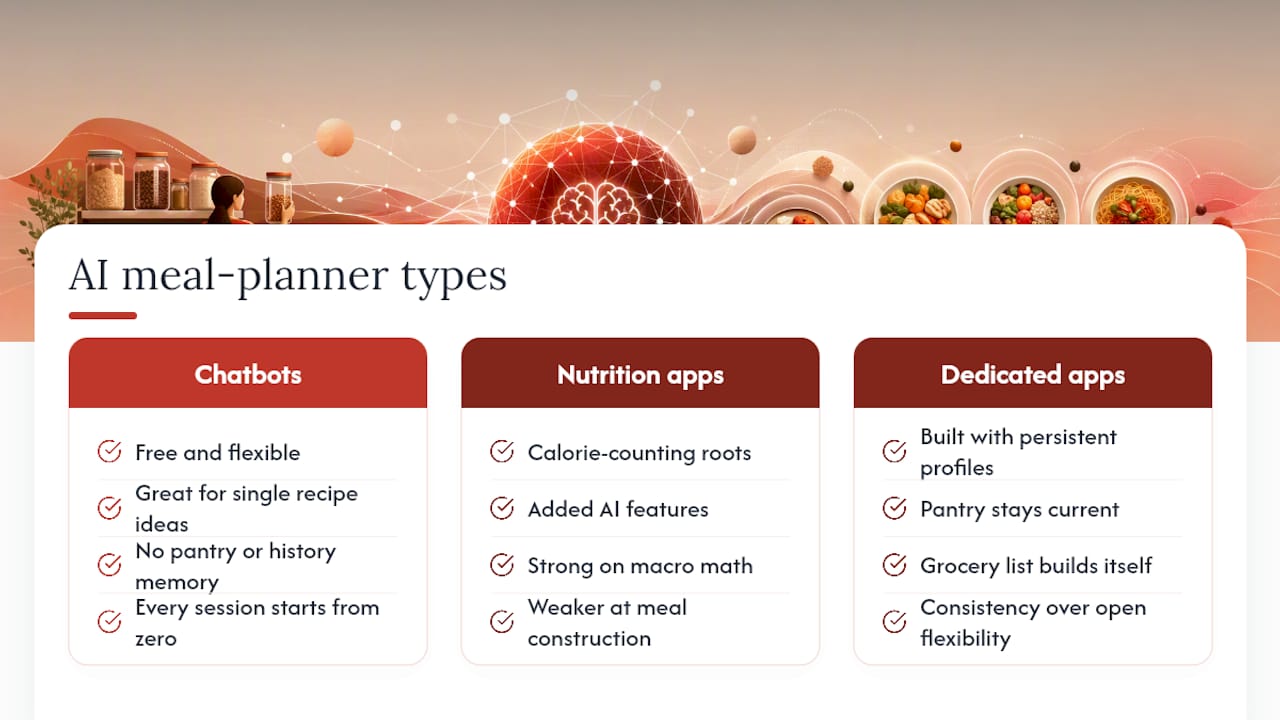
The AI meal planning space splits into three rough categories, and knowing which one you’re dealing with saves a lot of frustration. General-purpose chatbots sit at one end. They’re free, flexible, and excellent for a single recipe idea, but they carry no memory of your pantry or your dietary history from one chat to the next. Every session starts from zero.
In the middle sit nutrition-tracking apps that added AI features on top of calorie-counting tools built for a different job. They’re strong on macro math and weaker on actual meal construction. If you already log every bite, one of these might fit, but the meal suggestions often feel bolted on rather than built for weekly cooking.
At the other end are dedicated meal-planning apps built around persistent profiles from the ground up. These trade some of the chatbot’s open-ended flexibility for consistency: your pantry stays current, your grocery list builds itself, and your plan doesn’t repeat the same three dinners every week. Certain dedicated meal-planning apps fall into this category, with pantry tracking and guided recipes designed specifically around the weekly cadence rather than retrofitted onto a fitness tracker.
The right pick depends on what’s actually breaking down in your current routine. If inspiration is the bottleneck, a chatbot solves that cheaply. If the bottleneck is grocery chaos and food waste, you need something that remembers what’s in your fridge. For a deeper side-by-side, see our comparison of AI meal planner apps.
Integration with Fitness and Health Tracking Devices
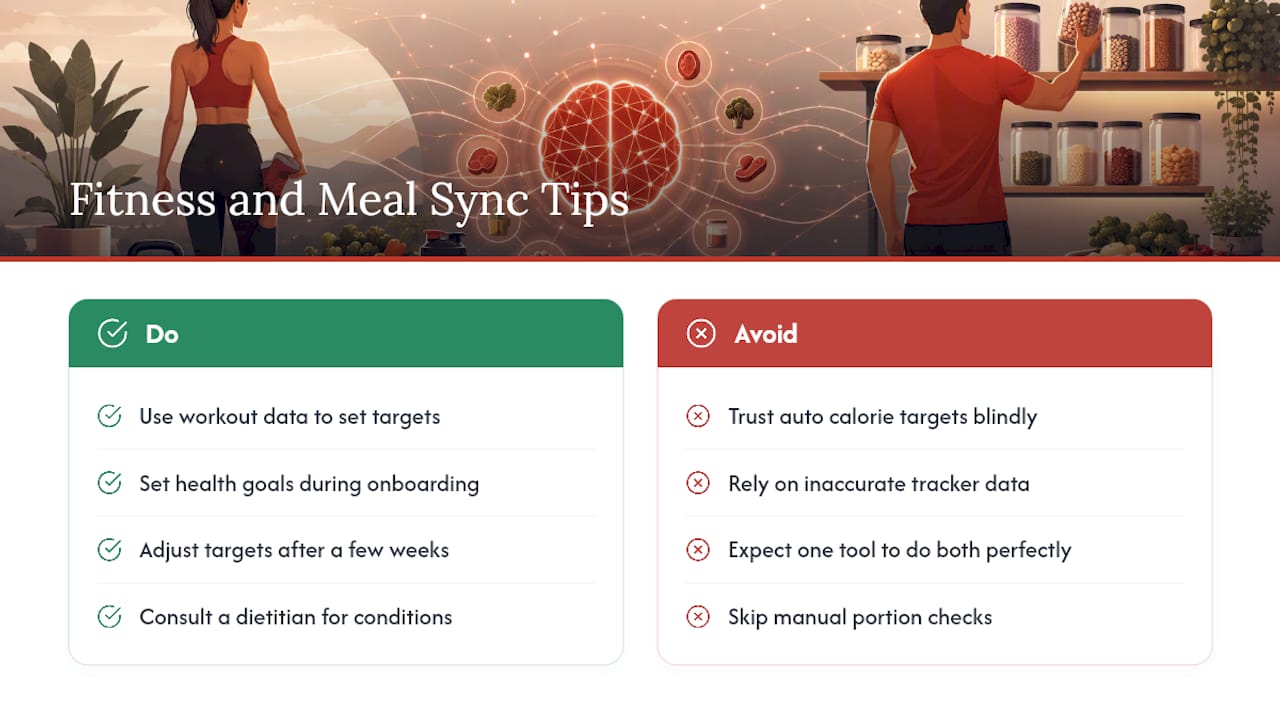
Meal planning and fitness tracking solve related but separate problems, and a lot of frustration comes from expecting one tool to do both jobs perfectly. Fitness trackers and health apps are excellent at logging what you burned and what you ate after the fact. Meal planning tools are better at deciding what to cook before you get to the kitchen.
Where AI adds real value is connecting the two directions. A meal plan built around a target calorie range or macro split (say, higher protein on strength-training days) can pull from the same logic that tracks your workouts, so the week’s dinners actually support the goal rather than working against it. Some pantry-aware apps let you set health goals directly during onboarding, which then shapes portion sizes and ingredient choices without you having to manually calculate macros for every recipe.
The practical limitation worth knowing: syncing is only as good as the data going in. If your fitness tracker overestimates calories burned during a workout, a meal plan built on that number will overshoot too. Treat any auto-generated calorie target as a starting point, not gospel, and adjust based on how your body actually responds over a few weeks. For anyone managing a specific health condition rather than general fitness goals, that adjustment period is exactly when a registered dietitian’s input matters most, since app-generated targets rarely account for medications, labs, or conditions that shift caloric needs.
Handling Dietary Restrictions and Allergies Beyond Basic Prompts
Typing “gluten-free” into a chatbot once isn’t enough to keep you safe, especially for anyone managing a true allergy rather than a preference. The problem is that a single mention in one prompt doesn’t carry forward. Ask for five more recipes in the same conversation, and a stateless tool can quietly drift back toward wheat-based suggestions or bury dairy inside a “creamy” sauce without flagging it.
The fix is treating restrictions as firm rules rather than passing preferences. Firm constraints (a nut allergy, a celiac diagnosis, a religious dietary law) need to be locked into your profile so every single output respects them, not just the ones where you remembered to repeat yourself. Flexible preferences (trying to eat less red meat, preferring spicier food) can stay looser and get adjusted week to week.
Cross-contamination and hidden ingredients are where AI tools stumble most. A recipe labeled “vegetarian” might still call for fish sauce. A “dairy-free” dessert might list a margarine brand that contains whey. This is exactly the kind of gap where dietitians point out that AI is strong on substitutions but weak on catching what it doesn’t know to look for. For anyone with a diagnosed allergy, treat every AI-generated recipe as a draft that needs a manual ingredient-label check, not a finished, safe result.
User Customization and Feedback Loops for Better Personalization
The plans you get in week one are rarely the plans you’ll still want in week eight. That’s normal, and it’s also where a lot of people give up on AI meal planning entirely, assuming the tool just doesn’t “get” them. The real issue is usually that nothing in the system is learning from what you actually cooked versus what you skipped.
A working feedback loop needs a few signals: which meals you actually made, which ones you swapped out before cooking, and which ones you made but wouldn’t repeat. Pantry-aware apps that track this over time start weighting future suggestions toward what you’ve kept, not just what you initially said you liked in an onboarding survey. That’s a meaningfully different kind of personalization than a chatbot re-reading the same static preference list every time.
The practical habit that speeds this up: don’t just accept or reject a suggested meal, tell the system why. “Too much cleanup” and “didn’t like the flavor” should steer future plans differently, and systems that only track a thumbs up or down lose that nuance. If your current tool doesn’t ask for that context, you’re leaving personalization on the table every single week. Give it a few weeks of honest feedback before deciding whether a tool fits your household, since the first plan almost never reflects what the system is actually capable of once it has real data to work from.
Privacy and Data Security When Using AI Meal Planners
Meal planning apps end up holding more personal data than people expect: health goals, medical dietary restrictions, household size, and sometimes payment information for grocery integration. That’s a meaningfully different privacy profile than a recipe blog, and it’s worth treating it that way.
Before committing to any tool, check a few basics. Does the app state clearly whether your data gets sold or shared with third parties for advertising? Is health-related information (allergies, medical diets, weight goals) treated with the same care as other sensitive health data, or lumped in with generic app analytics? Can you export or delete your data if you stop using the service?
General-purpose chatbots raise a separate concern: anything you type into a prompt, including detailed medical dietary needs, may be retained and used to improve the underlying model unless you’ve specifically opted out. Dedicated meal-planning apps built around a single purpose tend to have narrower, more auditable data practices, but that’s not automatic. Read the actual privacy policy rather than assuming a smaller app is safer by default. If a tool won’t clearly explain what happens to your data, that’s worth weighing against whatever convenience it offers.
Author Perspective: Simple Tips That Make a Weekly Plan Stick
Most people overhaul their entire week on day one and burn out by Thursday. Start with dinners only, or commit to one batch-cook meal that covers three nights, making it a perfect time for easy baking with kids and family memories. Automate just that piece before expanding to breakfasts and lunches.
Be ready to swap meals midweek. Plans built around a Tuesday grocery run rarely survive a Wednesday that goes sideways, and that’s fine. Just mark what you actually cooked so your pantry data stays honest. The one place I’d push back hard: AI output for anyone managing a medical diet needs a human check every time, not a spot check. A registered dietitian catches things a language model simply won’t.
— 0xmaglev
Try Homecooked: A Pantry-Aware Way to Run This Workflow
Some apps remember everything between sessions instead of making you retype your pantry every time. They build your household size, time budget, dietary rules, equipment, and current pantry into one profile, then generate weekly plans, consolidated grocery lists, and guided recipes with built-in timers, without the copy-paste routine a stateless chatbot demands.
Curious what a guided recipe actually looks like inside the app? Start with the cottage cheese protein bowl, a real example of how Homecooked turns pantry staples into a step-by-step cooked meal. From there, a free trial lets you build your own weekly plan and see whether the pantry-aware approach saves you the Thursday scramble a stateless prompt can’t fix.
Sources
AI tools hallucinate numbers. A chatbot might tell you a recipe has 320 calories per serving when it’s closer to 500, or list a “cup” of an ingredient that doesn’t match the actual recipe math. Health experts caution that AI can produce inaccurate or impractical meal suggestions, which means every plan deserves a quick sanity check before you build your week around it.
For actual nutrition facts, cross-check against USDA FoodData Central rather than trusting a chatbot’s math. For anyone managing a clinical condition, that verification step isn’t optional. Registered dietitians note that AI works well for substitutions and brainstorming but isn’t a substitute for professional guidance when portion sizes or sodium limits actually matter for your health.
Flag these specifically:
- How to Use AI for Meal Planning Step by Step (The Digital Life)
FAQ
Can I Use ChatGPT for Meal Planning?
Yes, ChatGPT works well for single-meal ideas and ingredient swaps, but it forgets your pantry and dietary rules between sessions unless you re-enter them, which makes it weaker for ongoing weekly plans than a pantry-aware app.
What Is the 3-3-3 Rule for Weight Loss?
Definitions of this rule vary across sources and it isn’t a standardized nutrition guideline, so treat any specific version you encounter with caution and check it against a registered dietitian or USDA MyPlate guidance before applying it.
How Do I Use AI to Build a Meal Plan?
Give the AI five inputs: household size, available time, firm and flexible dietary rules, kitchen equipment, and your current pantry. A tool like Homecooked stores these in a profile so you’re not re-entering them every week.
Is There a Free AI Diet Planner Available?
General chatbots like ChatGPT offer free meal suggestions, and most dedicated pantry-aware apps, including Homecooked, offer a free trial before any paid subscription kicks in.
How Long Does It Take to Set Up an AI Meal Plan?
Initial setup, including entering your household details, dietary rules, and pantry, typically takes 15 to 25 minutes, with weekly upkeep dropping to 3 to 8 minutes once your profile exists.