
An AI recipe helper turns whatever you already have (a handful of ingredients, a fridge photo, or a quick prompt like “high protein, 20 minutes”) into a complete, cookable recipe. It works best for cooks who hate wasting food and want fewer decisions between “I’m hungry” and “dinner’s ready.” Homecooked is one option built specifically around this pantry-first workflow.
TL;DR:
- Pantry scanning and photo recognition help generate recipes from what you already have, reducing food waste and decision fatigue.
- Fully customizable controls over servings, time, and substitutions are essential for tailoring recipes to your needs.
- Meal planning features that export grocery lists and track nutrition make weekly cooking more efficient and less wasteful.
- Testing the app with unusual ingredients reveals its substitution logic, indicating how well it adapts to real-world pantry variability.
- Always review privacy policies and permission settings before uploading pantry data or fridge photos to ensure data safety.
Table of Contents
- How Does an AI Recipe Helper Actually Work?
- What Features Actually Matter in an AI Recipe Helper?
- What Are Some Real Prompts You Can Try Tonight?
- Is It Safe to Upload Fridge Photos and Pantry Data?
- What Do Free Plans Include, and When Is Paying Worth It?
- How Does Homecooked Approach Pantry-First Planning?
- Why the “Just Ask ChatGPT” Advice Misses the Point
- Try Homecooked’s Pantry-First Tools Before You Subscribe Anywhere
- Where to Verify These Details Yourself
- Sources
- FAQ
How Does an AI Recipe Helper Actually Work?
Every tool in this category runs on the same basic loop: you give it something to work with, and it hands back something you can cook. The quality of what comes out depends entirely on what you feed in, and understanding that trade helps you get better results faster.
On the input side, most apps accept a mix of:
- Typed ingredients (“chicken thighs, spinach, half a lemon”)
- A pantry list you’ve already logged, so the app knows what’s on hand
- A photo of your fridge or counter, which the app scans to identify items
- A dietary profile (keto, vegan, gluten-free, allergy flags)
- Constraints like time available, skill level, or servings needed
Once it has that, the tool interprets your prompt, decides how to scale quantities, applies substitution logic when something’s missing, and estimates nutrition based on the final ingredient list. That processing happens in seconds, but it’s doing real work: matching flavor profiles, adjusting cook times for the equipment you mentioned, and flagging swaps if you’re out of an ingredient.
What you get back is a recipe card with exact quantities, numbered steps, often a built-in timer for each stage, and sometimes an auto-generated shopping list for whatever you’re missing. Some tools default to a chat interface where you refine the recipe conversationally; others use a structured form. The better ones offer a “cook mode” that walks you through steps one at a time instead of forcing you to scroll a wall of text while your hands are covered in flour, a distinction multiple recipe-management platforms treat as a core feature rather than an afterthought.
What Features Actually Matter in an AI Recipe Helper?
Not every recipe app deserves your data or your subscription. Before you commit to one, run it through this checklist:
- Pantry or fridge scanning. Can it generate recipes from what you type or photograph, rather than pushing you toward recipes that require a grocery run? Ingredient-first tools that start from your pantry tend to cut both food waste and decision fatigue, since you’re cooking around what’s already there instead of shopping to match a recipe.
- Persistent dietary profiles. A good app remembers you’re vegan or allergic to shellfish so you don’t re-enter it every session.
- Real customization. Look for controls over servings, total time, and skill level, plus visibility into why a substitution was suggested.
- Meal planning and grocery export. Weekly plans should convert into a shopping list you can actually use at the store, ideally synced or shareable.
- Nutrition estimates. Calorie and macro breakdowns should be visible on the recipe card, not buried in a separate screen.
- Interactive cook mode. Step-by-step guidance with built-in timers changes cooking from “reading a reference” to “following a guide,” which matters most on busy weeknights.
- Offline or low-friction mobile use. If you’re cooking with wet hands, you don’t want to fight a slow interface.
Free tiers usually cap how many recipes you can generate per day and limit saving or exporting. Paid plans typically unlock unlimited generations, pantry sync, and full meal-plan exports.
Pro Tip: Test any recipe app with an intentionally weird ingredient combination first, like leftover rotisserie chicken and half a can of coconut milk. How it handles an odd pairing tells you more about its substitution logic than a clean, easy prompt ever will.
What Are Some Real Prompts You Can Try Tonight?
Theory is fine, but the fastest way to judge an AI recipe helper is to throw a real problem at it. Here are three worth testing right now.
- Fridge rescue: “I have half a rotisserie chicken, three eggs, a wilting bunch of kale, and rice. What can I make tonight?” A solid tool returns a complete dish, not just a suggestion, with quantities and a cook time attached.
- Quick weeknight: “20-minute dinner, one pan, no dairy.” This tests whether the app respects hard time constraints instead of quietly padding the recipe with a marinating step it hopes you’ll skip.
- Goal-driven meal prep: “High-protein lunches for five days, minimal repeat ingredients.” A capable planner should return a shopping list alongside five distinct meals, not the same chicken-and-rice bowl five times over.
Once you get a result back, iterate. Ask it to swap the protein, change the cuisine direction (“make this more Korean”), or scale servings up for meal prep. A tool worth keeping should handle all three requests without regenerating the recipe from scratch. Homecooked’s guided recipe format with timers is built around exactly this kind of iteration, since parallel steps and live timers make it easier to adjust a plan mid-cook rather than start over.
Is It Safe to Upload Fridge Photos and Pantry Data?
Before you upload a photo of your fridge or sync your pantry inventory, know what you’re handing over. Recipe apps commonly collect account details, dietary preferences, pantry item lists, and sometimes photos you submit for ingredient recognition.
Check these before you commit real data:
- The app’s own privacy policy, cross-referenced against platform-wide privacy policies that govern how developers must disclose collection and controls
- Device-level permissions, which you can review and revoke through official permission management tools
Quick gut check: try the app with a fake or minimal pantry list before you feed it your real data. If the recipe quality holds up without your full inventory, you’ve learned something useful about how much access it actually needs.
What Do Free Plans Include, and When Is Paying Worth It?
Free tiers exist to let you kick the tires, not to run your whole kitchen. Expect caps like a limited number of recipe generations per day, no meal-plan export, and restricted saving or sharing.
Paid subscriptions typically add:
- Unlimited or much higher recipe generation limits
- Full meal-plan export and grocery-list sync
- Pantry tracking that persists across sessions
- Deeper nutrition breakdowns
Watch for whether a trial requires a credit card up front and how easy cancellation actually is; that detail tells you more about a company’s confidence in its product than any marketing page will. If you cook occasionally and just want dinner ideas, a free tier is probably enough. If you’re planning every week and building a shopping list around it, the paid tier usually pays for itself in reduced grocery waste alone.
How Does Homecooked Approach Pantry-First Planning?
Homecooked builds its entire workflow around what’s already in your kitchen rather than what a recipe database thinks you should buy. The app generates personalized meal plans tied to your health goals and dietary preferences, then turns each recipe into a guided, step-by-step format with live timers so you’re not juggling three browser tabs while something burns.
One feature worth trying immediately, even without an account, is the free shared grocery list, which lets you build and split a shopping list with no sign-up required. That maps directly onto the meal-planning and grocery-export item on the checklist above, and it’s a low-friction way to see how the pantry-first approach feels before committing to anything else.
Why the “Just Ask ChatGPT” Advice Misses the Point
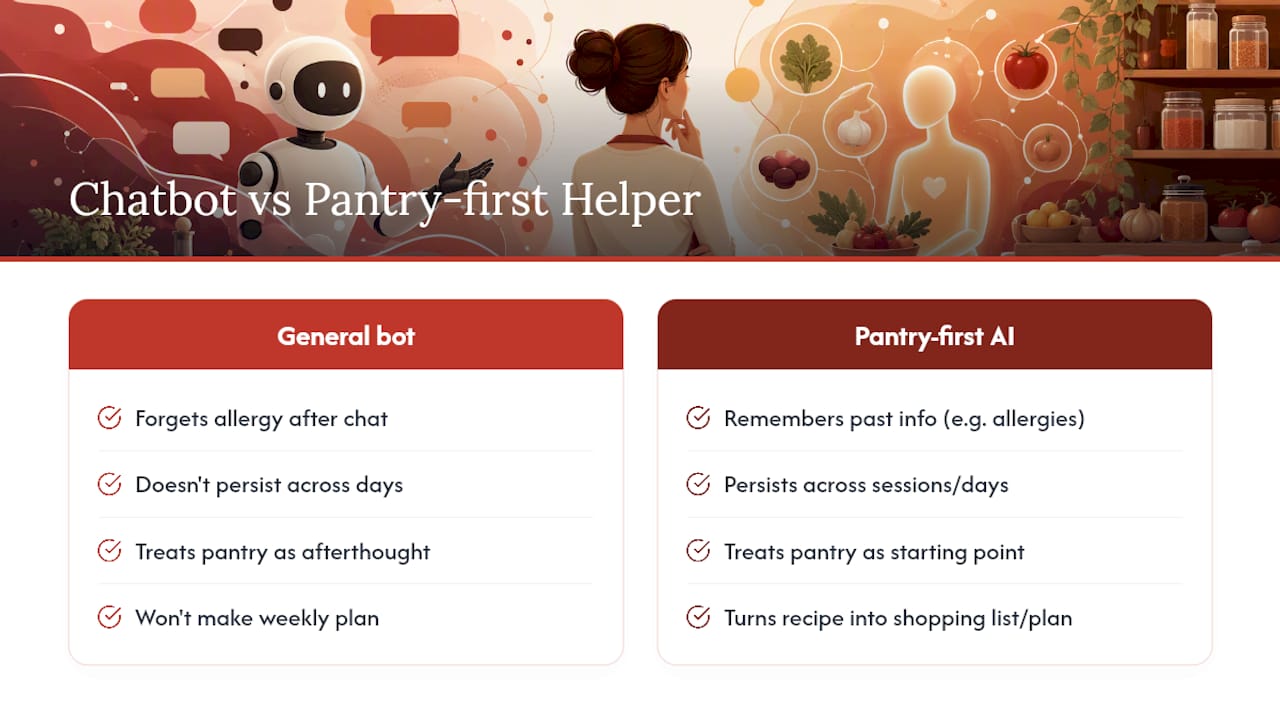
Plenty of cooking advice online tells you to just ask a general chatbot for a recipe, and that works fine for a one-off. What that advice skips is the part that actually changes your week: persistence. A general chatbot forgets your allergy the moment the chat closes. It won’t turn Tuesday’s recipe into Wednesday’s shopping list, and it definitely won’t hand you a timer while your hands are covered in flour.
The real value of a purpose-built AI recipe helper isn’t the recipe generation itself, that part is table stakes now. It’s whether the tool remembers what you told it yesterday, whether it treats your pantry as the starting point instead of an afterthought, and whether it turns a single meal idea into a week you don’t have to think about twice. Readers chasing the flashiest AI model over the most usable pantry-first workflow are optimizing for the wrong variable. Start with what’s already in your fridge, not with which model claims the highest benchmark score.
— 0xmaglev
Try Homecooked’s Pantry-First Tools Before You Subscribe Anywhere
Certain apps focus on turning what’s in your kitchen into a real plan, with guided recipes and timers that help keep you moving instead of guessing.
Before you commit to any paid subscription, start with the free shared grocery list, which requires no sign-up and shows you how the pantry-first approach feels in practice. From there, check out the main app to see personalized meal plans and guided recipes with timers in action, or browse a sample output like the Butadon recipe to get a feel for the format. Whatever tool you land on, compare privacy settings and trial terms side by side first. Ready to see what your pantry can actually make tonight? Head to homecooked.fun and start with the free features.
Where to Verify These Details Yourself
- Google Play permission management help for reviewing or revoking app access
- Homecooked’s recipe app roundup for a broader comparison of tools in this category
Sources
FAQ
What Is the Best Free AI Recipe Generator?
There’s no single universal answer since “best” depends on whether you need pantry scanning, meal planning, or just one-off recipe ideas, but most apps, including Homecooked, offer a free tier or free feature (like Homecooked’s shared grocery list) worth testing before you compare further.
Which AI Is Best for Cooking Recipes?
General chatbots handle simple one-off recipe requests fine, but purpose-built recipe apps outperform them on persistent dietary profiles, pantry tracking, guided cook-mode timers, and grocery-list generation, features a general chatbot doesn’t retain between sessions.
Can ChatGPT Generate Recipes?
Yes, ChatGPT can generate a recipe from a list of ingredients or a prompt, but it won’t remember your allergy profile across sessions, build a shopping list automatically, or offer step-by-step cook-mode timers the way dedicated recipe apps do.
Is There a Free AI Food Generator Available?
Yes. Most AI recipe helpers, Homecooked included, offer either a free tier with daily generation limits or a standalone free feature, so you can test the core experience before deciding whether a paid plan fits your cooking habits.
How Do I Know if an App Is Handling My Pantry Photos Safely?
Check the app’s Data safety section on its store listing and its privacy policy before uploading anything, and test with a minimal or fake pantry list first to see how much access the app actually needs to function well.