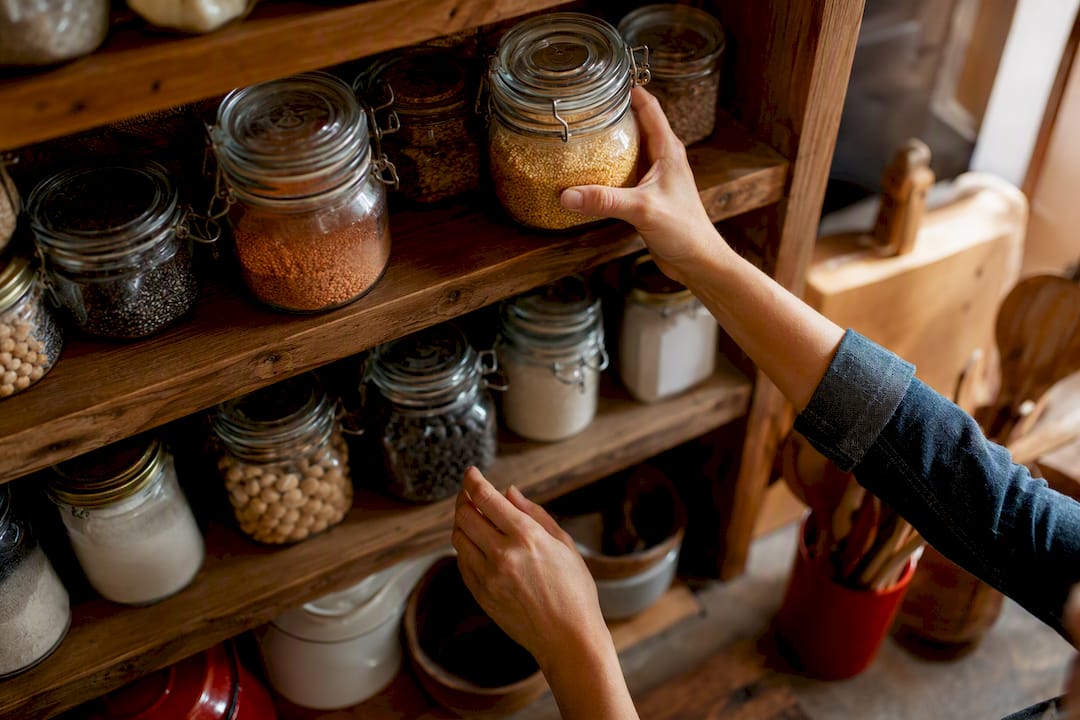
The fastest way to stop overbuying and cut pantry waste is a simple inventory plus a synced digital tool that gives expiry alerts and shopping-list sync. Pantry inventory tracking doesn’t need to be complicated to work. You have two solid routes:
- Quick manual: Labels on shelves plus a shared spreadsheet, updated weekly.
- Digital: An app that scans barcodes, flags expiring items, and syncs straight to your grocery list.
The payoff is real money. The average U.S. household throws out roughly $1,500 worth of food a year, and most of that loss traces back to forgotten items buried behind newer ones. Homecooked builds pantry tracking directly into meal planning and grocery automation, so the system you set up today keeps working without extra effort next week.
TL;DR:
- Barcode scanning and expiry alerts in digital pantry apps significantly reduce duplicate purchases and waste, especially in larger households.
- Conducting a comprehensive inventory session takes around two hours, with the most effective system being one maintained through a consistent weekly quick check.
- Manual or spreadsheet systems remain viable if they map storage locations and track critical data like purchase and expiration dates accurately.
- Ongoing upkeep, including daily updates and weekly reviews, is crucial to prevent inventory drift and keep the system reliable over time.
- Proper inventory management directly cuts household food waste, saving an average of $1,500 annually.
Table of Contents
- Which pantry inventory system fits your household?
- Manual and spreadsheet systems that actually work
- What to look for in a digital pantry tracker
- How do you set up your pantry inventory in one sitting?
- Keeping your pantry stock management routine simple
- Why inventory tracking matters for your grocery budget
- Turning your pantry list into a smarter grocery list
- Comparing popular pantry tracking apps
- Pantry tracking templates to copy today
- Key Takeaways
- Sources
Which pantry inventory system fits your household?
Before you commit an hour to setup, figure out which method matches how you actually cook and shop. A single person with a small pantry doesn’t need the same setup as a family of four running through groceries every three days.
- Effort: Manual index cards or labels take minutes to start but demand constant upkeep. Spreadsheets take longer to build but hold more data. Apps take the most setup time upfront and the least maintenance afterward.
- Accuracy: Apps with barcode scanning and expiry tracking beat memory every time, especially once your pantry holds more than 40 or 50 items.
- Best fit: Solo cooks with a compact pantry often do fine with a sticky-note system or a basic spreadsheet. Families or shared households benefit more from an app, since multiple people are pulling items out and nobody remembers to update a paper list consistently.
A solo cook with 20 pantry staples can track everything on a single spreadsheet tab in five minutes a week. A family of four juggling three kids’ schedules and a shared fridge needs something that syncs in real time. That’s the difference between a nice idea and a system that survives past week two.
Manual and spreadsheet systems that actually work
You don’t need software to run a functional kitchen inventory system. You need a structure that’s consistent enough to trust.
- Map your storage locations first. Walk through your pantry, fridge, freezer, and any overflow shelves, and assign each a label. Decide on units now, whether you’re counting cans, servings, or fractions of a bag, so your numbers mean the same thing every time.
- Build your spreadsheet with purpose. Useful columns include item name, location, quantity, unit, purchase date, and expiration date. A simple conditional format that highlights any row where quantity drops below two turns your sheet into a low-stock alert system for free.
- Label opened items separately. A jar of salsa you opened Tuesday has a different shelf life than an unopened one in the back. Write the opened date on the lid with a marker, and track it as its own line if it’s something you use often, like sauces, cheeses, or nut butters.
- Use batch entry and photo backups. Enter items in clusters by category rather than jumping around, and snap a photo of each shelf before you close the cabinet. It’s a fast way to double-check your list later without digging through the pantry again.
Pro Tip: Keep a printed copy of your spreadsheet’s low-stock tab on the fridge. It turns “check the app” into “glance and go” for anyone in the house grabbing the last box of pasta.
What to look for in a digital pantry tracker
A digital pantry inventory tool earns its place in your kitchen by cutting steps, not adding them. Judge any app against this checklist before you commit to it.
- Barcode scanning for fast entry, especially during a big grocery haul.
- Expiry tracking that sends alerts before food goes bad, not after.
- Multi-location support so your freezer, fridge, and pantry stay separate but searchable together.
- Household sharing so everyone updates the same list instead of keeping their own mental tally.
- Shopping-list sync that turns low or empty items into a ready-to-use grocery list automatically.
- CSV export and backup options, so your data isn’t locked into one app forever.
App listings consistently show barcode scanning, expiry alerts, and recipe matching as the three features people rely on most for everyday pantry management, and for good reason: each one maps directly to a specific waste problem. Barcode scanning cuts duplicate purchases. Expiry tracking cuts expired throwaways. Multi-location tracking cuts the “I thought we had another one” moment that sends you back to the store.
Some tools go further with receipt import, opened-product tracking, or AI-driven recipe suggestions based on what’s about to expire. These are genuinely useful once your baseline system is running, but they’re optional polish, not a starting requirement.
How do you set up your pantry inventory in one sitting?
Treat your first pantry inventory session like meal prep: gather everything, block off time, and work in batches. Most people spend an hour or two populating a full pantry, fridge, and freezer, so plan for that rather than expecting a ten-minute job.
- Gather your tools. Pick your method (spreadsheet or app) and have it open before you start moving items.
- Work location by location. Start with the pantry, then the fridge, then the freezer. Finishing one space fully before moving to the next keeps you from double-counting or missing shelves.
- Group entries by category. Enter all your canned goods together, then all your baking supplies, then dairy. This clustering makes future audits and recipe matching noticeably faster, since related items sit next to each other in your list.
- Use shortcuts where they exist. If your app supports receipt scanning or continuous barcode scanning, use it for the bulk of packaged goods, and reserve manual entry for loose produce or bulk-bin items.
- Snap photos as you go. A shelf photo doubles as a backup if you mistype a quantity or forget an item.
- End with a shopping list. Before you close the session, generate a list of everything at zero or near-zero. That’s your starting grocery run, built directly from real data instead of guesswork.
Pro Tip: Do the freezer last. It’s the space most people avoid, which means it’s usually the one with the most forgotten, freezer-burned surprises worth clearing out.
Keeping your pantry stock management routine simple
An inventory system only works if the upkeep is lighter than the payoff. Build your maintenance around three simple checkpoints.
- Daily: Update your list the moment you unload groceries or pull the last of something while cooking. It takes seconds and prevents drift from building up.
- Weekly: Spend 10 to 15 minutes reviewing expiring items and topping off anything running low.
- Monthly: Do a full reconciliation. Walk the shelves, clear out anything expired, and correct any counts that have quietly gone wrong.
Drift is the real threat to any pantry organization ideas system, not laziness. It creeps in through half-updates: you use an item but forget to log it, or you buy a replacement and now the app thinks you have two. If your list stops matching reality within a few weeks, shorten your weekly check to five focused minutes on just the items you cook with most, rather than abandoning the whole system.
Pro Tip: Set your weekly sweep for the same time you build your grocery list. Updating inventory and shopping in one sitting means you never trust a stale number.

Why inventory tracking matters for your grocery budget
The case for tracking your pantry isn’t sentimental, it’s financial. U.S. households waste roughly $1,500 in food annually, and most of that loss comes from items that expired unnoticed, not from bad cooking or picky eaters.
Retail inventory management runs on a few core principles that translate surprisingly well to a home kitchen. Oracle’s grocery inventory guidance points to first-in, first-out rotation and demand granularity, tracking fast-moving items more closely than slow ones, as the backbone of reducing spoilage at scale.
Placing your oldest cans and jars at the front of the shelf, and checking perishables more often than pantry staples, isn’t a grocery-store trick. It’s the same logic that keeps a retail cooler from losing product, scaled down to fit your kitchen.
For readers who want to go deeper, open-source projects like EverShelf demonstrate what a self-hosted, fully customizable pantry system looks like, complete with AI expiry estimation and continuous barcode scanning. It’s a technical path, not a beginner one, but it shows how far these principles scale.
Turning your pantry list into a smarter grocery list
Tracking your pantry only pays off once it feeds directly into how you shop and cook — for nutrition-focused workflows, check out the EmpowerFit Women meal planner. The two need to talk to each other.
- Build your grocery list from what’s low, not from memory. A list generated straight from near-empty inventory items avoids duplicate purchases far better than a mental scan of the fridge.
- Match recipes to what’s already on hand. Instead of planning meals first and shopping second, flip the order and build dinner from your pantry staples to burn through ingredients before they expire.
- Keep one shared list per household. Multiple tracking systems across family members guarantee mismatched counts; a single shared grocery list keeps everyone working from the same numbers.
This is where grocery list tracking stops being a chore and starts saving real trips to the store, because you’re shopping to fill actual gaps instead of restocking blind.
Comparing popular pantry tracking apps
Pantry apps generally fall into three tiers, and picking the right one depends on how much manual effort you’re willing to trade for setup time.
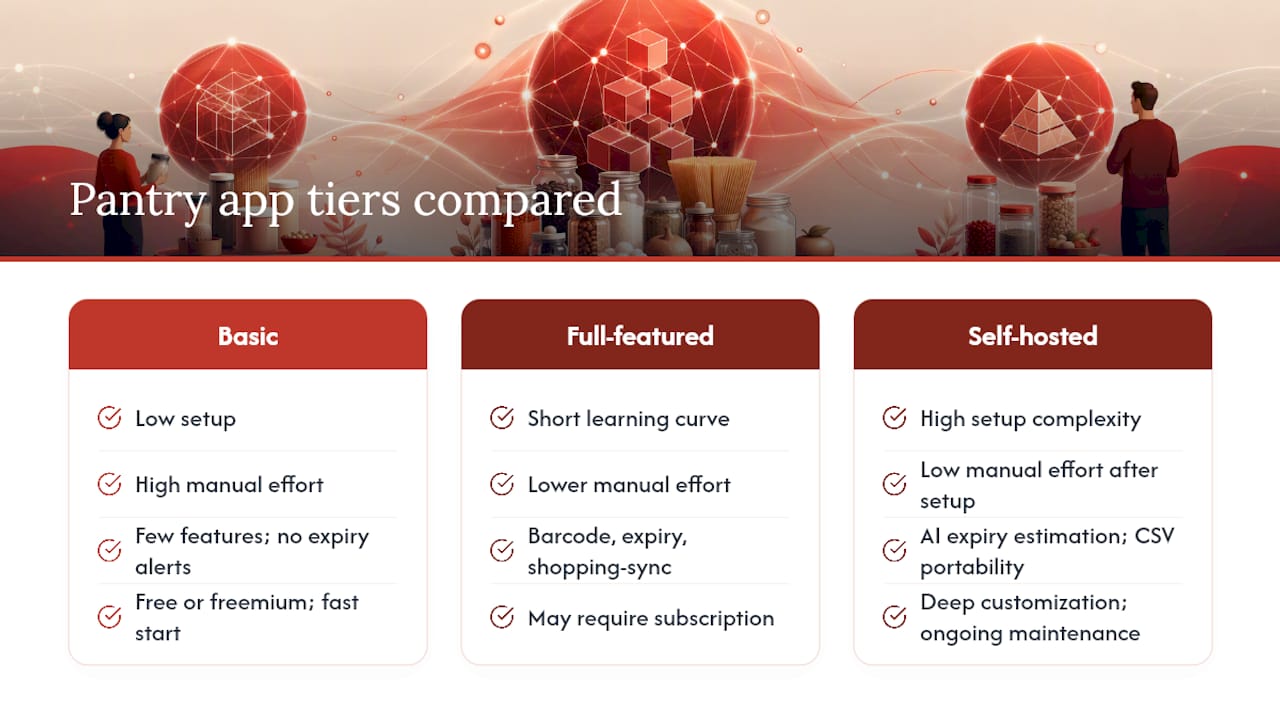
Basic list-style apps work like a digital notepad: you type in items and check them off. They’re fast to start and free in most cases, but they rarely include expiry alerts or barcode scanning, so the accuracy burden stays on you.
Full-featured pantry apps add barcode scanning, expiry tracking, and shopping-list sync in one package. These tend to require a short learning curve and sometimes a subscription, but the time saved on manual updates usually justifies it within a few weeks, especially for households managing more than one shopper.
Self-hosted or open-source tools like EverShelf sit at the technical end of the spectrum. They offer the deepest customization, including AI-based expiry estimation and CSV data portability, but they require comfort with setup and ongoing maintenance that most casual users won’t want to take on.
The trade-off across all three tiers is consistent: less manual effort almost always means more reliance on the app’s scanning and alert accuracy, while more manual control means more of your own time spent typing and checking. Homecooked sits in the full-featured tier, pairing pantry tracking with meal planning so the inventory data does double duty instead of sitting in an app you only open once a week.
Pantry tracking templates to copy today
You don’t have to design a spreadsheet from scratch. A working food inventory checklist needs just a handful of columns to function well.
A basic template includes: Item Name, Category (canned, baking, dairy, frozen), Location, Quantity, Unit, Purchase Date, Expiration Date, and a Low Stock flag. Add a simple formula that highlights any row where quantity falls below your personal threshold, whether that’s one can or three servings, and the sheet starts doing the alerting for you.
For a family managing more volume, split the template into separate tabs by location: Pantry, Fridge, Freezer. It keeps each list shorter and easier to scan during a quick weekly check, rather than scrolling through 60 rows to find the dairy section.
If you’d rather start from an existing list of essentials instead of a blank sheet, Homecooked’s pantry staples checklist gives you a starting inventory of common items to build from, so you’re editing quantities instead of typing every ingredient name from memory. Whatever format you choose, the goal is the same: a structure simple enough that updating it takes less time than the waste it prevents.
What I’ve learned about setup time versus payoff
Setting up a full pantry inventory takes real time, usually closer to two hours than twenty minutes, and that upfront cost is where most people quit before seeing any benefit. The shift that changes everything isn’t more features, it’s committing to one weekly sweep no matter how small. A five-minute check every Sunday beats an elaborate system you abandon by week three. Pick a method you’ll actually keep using, not the one that looks the most impressive on day one.
— 0xmaglev
How Homecooked turns your pantry list into dinner
Homecooked builds pantry tracking directly into the same app that plans your meals, so the inventory you enter doesn’t sit idle between grocery runs. It maps straight to the checklist covered above: tracked items feed automated shopping lists, and those lists connect to recipes matched to what’s already in your kitchen.
In your first week, expect Homecooked to generate a shopping list pulled from your actual low-stock items rather than a guess, and to suggest recipes that use ingredients you already have instead of ones that send you back to the store. If you’re short on inspiration for what to cook from pantry basics, the bibimbap recipe is a solid example of a meal built almost entirely from shelf-stable and fridge staples. Start a free trial and let your next grocery list build itself from what’s already in your kitchen.
Key Takeaways
Consistent pantry tracking, paired with a weekly maintenance habit, is what actually prevents the roughly $1,500 in annual household food waste that most families never notice accumulating.
| Point | Details |
|---|---|
| Pick one method and start | Choose manual, spreadsheet, or app based on household size, then commit before overthinking features. |
| Label opened items separately | Track opened dates on sauces, cheeses, and nut butters since their shelf life shortens once opened. |
| Apply FIFO at home | Place older items at the front of shelves and check perishables more often than pantry staples. |
| Build a weekly sweep habit | Spend 10 to 15 minutes updating expiries and restocking low items at the same time each week. |
| Let inventory drive your grocery list | Homecooked turns tracked pantry items into an automated shopping list and matched recipes. |
Sources
For verification or deeper detail, the USDA ERS food-waste report covers the household waste estimate cited above, Oracle’s grocery inventory guidance explains the FIFO and demand principles referenced, and the EverShelf GitHub project documents the advanced, self-hosted features mentioned for technical readers.
- Oracle — Grocery inventory management and inventory principles
- EverShelf — open-source smart pantry manager (GitHub)